Browser agent · Free for a day · Chrome
The AI agent that watches your browser and flags the scam before you click.
A cyber concierge that lives in your toolbar, reads every page the way a fraud analyst would, grades the site A-F, and, on the pages that matter, actually looks at what’s on your screen to catch the fake login the URL won’t betray. Try it free for a day. After that it’s included with every Syba plan. Backed by the people who pay the claim.
How the free day works.
Install it
Add it to Chrome. It starts protecting you straight away, and the day runs from the moment you install.
24 hours of full protection
For the first 24 hours the agent runs in full, with nothing to pay.
Then it pauses, unless you are a member
When the day is up, protection pauses and the extension asks you to subscribe or sign in. Any Syba plan includes it, from $49 a month. Members are never paused.
Nine ways it catches the attack before you do.
Watches every tab, automatically
The agent evaluates each page the moment it loads, real-time, passive, no click required. It reads the page the way a fraud analyst would.
Phishing + brand impersonation
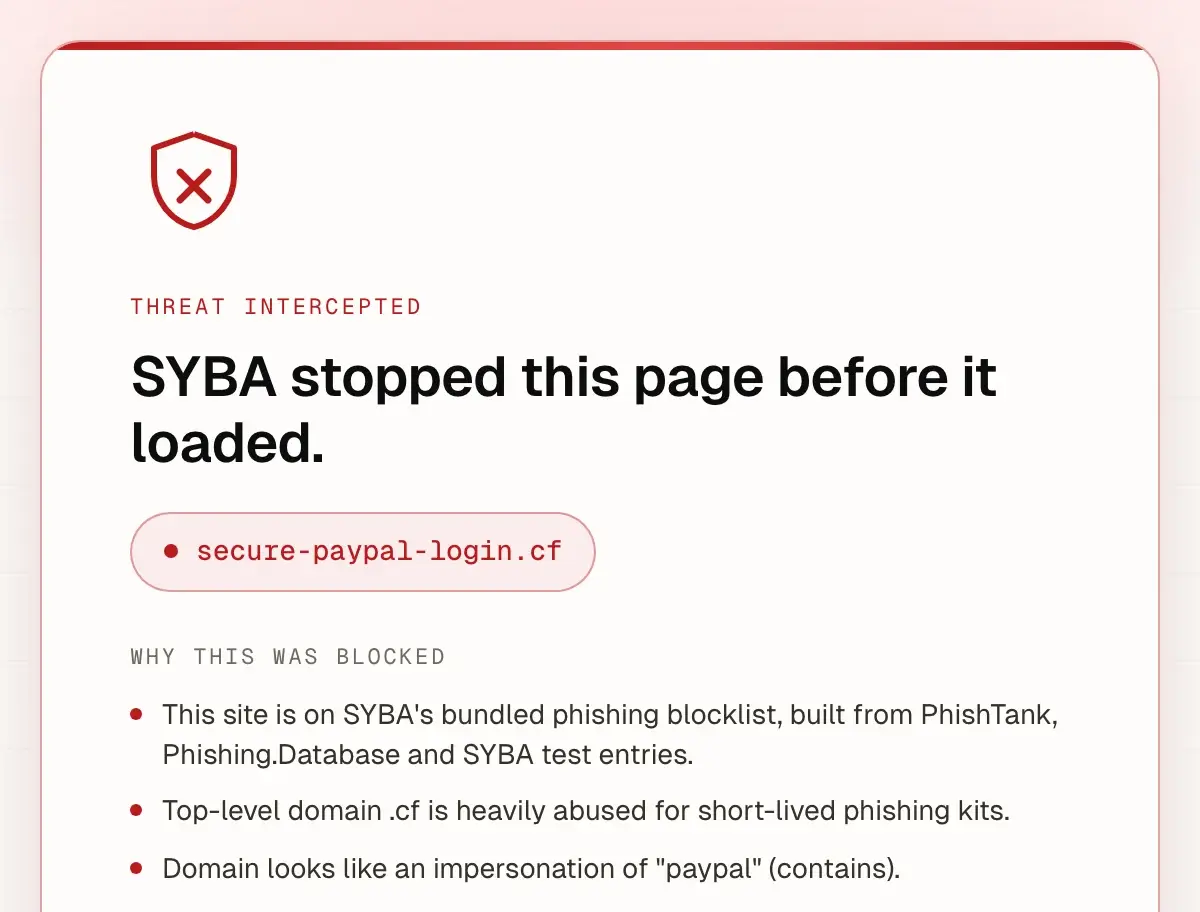
Lookalike and typosquat domains, IDN / homoglyph spoofs (Cyrillic “аррӏе” → apple), fake login pages and credential traps. On-device URL and page checks.
A-F site grade, scored /100
Every site gets a letter grade and a findings list. Open “See full audit” or ask the agent to “Explain in detail.”
Network sentry
Blocks known phishing hosts at the network layer and, once you grant network access, flags suspicious page, script and XHR requests.
Vision AI · the agent sees what you see
On the pages that matter, it reads the rendered screen to catch scams the URL alone won’t reveal: fake MFA prompts, fake browser warnings, lookalike logos. It turns on when you sign in.
A system alert the moment a page looks wrong
Once you allow notifications, a system notification steps in the moment a page looks dangerous, outside the page the scammer controls.
Streaming chat agent
Ask “why did you flag this?” and the agent explains the actual signals it saw. Sign in, or add your own OpenRouter key, to unlock chat.
One-click allow / report
“Allow this site” trusts it and reloads. “Report safe” also sends the site to SYBA for a person to review.
A curated safe list of about 200 domains
Major legitimate services and their brand-owned CDN and sign-in domains, so the agent does not false-flag the sites you use every day.
What the SYBA browser agent checks on each page
These are five of the checks the agent runs in Chrome. Pick a made-up page and watch the agent work through the list.
A demonstration. Both websites are made up, on the reserved .example domain, and nothing here checks your own browser.
Lookalike domain
Flagged, High severity
Compares the address with the brands the agent tracks, including swapped letters, digits that stand in for letters and characters from other alphabets.
The address imitates a brand the agent tracks, here with the digit 1 in place of the letter l.
Password over HTTP
Passed
Looks for a password field on a page that is not encrypted with HTTPS.
The page is encrypted, or it asks for no password.
Form posting to another site
Passed
Reads where each form sends what you type, and flags a form that sends to a different site than the page.
No form sends to a different site.
Proxy login
Flagged, Medium severity
On a sign-in page that imitates a brand, checks whether every resource loads from that one host, as a relay between you and the real site would. It stays quiet on pages that do not imitate a brand.
The sign-in page imitates a brand and serves everything from one host, which is how a credential relay behaves.
ClickFix clipboard trap
Passed
Notices when a page puts a command on your clipboard and also tells you to run it. Either one alone is not flagged, and the agent never reads your clipboard.
No command was copied together with instructions to run it.
2 warnings
Two checks flagged this page. The address imitates a brand, and the sign-in page behaves like a relay. The agent would flag it.
The agent reads more signals than these five, and no check catches every attack.
Check a website yourself
Site Check reads a website's public security setup (HTTPS, headers, cookies, mixed content and email records), the same layer as the password over HTTP check; it does not score phishing.
Syba never sees your passwords or keystrokes.
The on-device checks run locally: URL heuristics, DOM signals, the network sentry and the letter grade. No browsing data leaves your device. Vision AI and chat are explicit opt-in cloud features: the vision check sends one screenshot of the tab with its address and title, and chat sends your messages with the page address and title. Neither ever sends passwords, keystrokes or cookies.
Never sees your passwords or keystrokes.
On-device checks: no browsing data leaves your device.
Vision AI and chat are explicit opt-in: sign in, or use your own key.
The vision check sends one screenshot of the tab with its address and title.
Three honest tiers. Strong by default, deeper when you opt in.
On-device heuristics
URL heuristics, DOM signals, the network sentry and the A-F letter grade run locally. No browsing data leaves your device. This is the default, the moment you install.
Opt-in Vision AI scan
On the pages that matter, the agent captures a single screen frame and reads it to catch scams the URL hides. Explicit opt-in: sign in to Syba or supply your own OpenRouter key.
Optional chat
Sign in, or add your own OpenRouter key, to unlock the streaming chat agent. It explains the signals behind every flag.
Personal, or your whole company.
For one person, the agent is free for a day and then included with every Syba plan, from $49 a month. Companies deploy it to every employee, one seat per person, at EUR 9 a seat a month. 5 to 24 seats is Team, billed monthly or annually at the same price; 25 or more is Enterprise, billed annually, by card or through a sales-led contract.
One person, one browser
Try it free for a day. After that it’s included with every Syba plan.
Free for a day
- URL heuristics, DOM signals, the network sentry and the A-F letter grade run locally.
- No browsing data leaves your device for the on-device checks.
- Optional sign-in unlocks the streaming chat agent.
- Included with every Syba plan, from $49 a month. Members are never paused.
After the day, protection pauses unless you have an active Syba plan.
The first step into everything Syba protects.
The agent is the way in to the Syba ladder. Try the browser layer that catches phishing at the source for a free day, then keep it with any Syba plan.
PersonalGuard
Personal cyber cover for individuals and families, up to a $5M ceiling, with capacity from A-rated carriers.
Syba Core
The app, the 24/7 help desk, and behavioral training, the everyday protection layer for the household.
Secure Syba
Corporate and broker products for boards, AI-agent operators and wholesale brokers.
Put a fraud analyst in your toolbar.
Try it free for a day. After that it’s included with every Syba plan.
Backed by A-rated carriers (Tokio Marine HCC & Chubb)
Syba is not licensed as an insurance agency or third-party administrator in any jurisdiction. We do not engage in the solicitation of insurance. For any questions regarding insurance, for Europe please contact customer.service@syba.io. For USA please contact EPIC Insurance Brokers & Consultants: clientserviceinquiry@epicbrokers.com or +1 (407) 378 6203.